

Frontend SDK
Framework-agnostic calls, events, readiness, feature detection, and browser-oriented interfaces. Use React, Vue, or plain JavaScript around that public boundary.
TypeScript SDK exports ↗AURORAVIEW / HOW IT WORKS
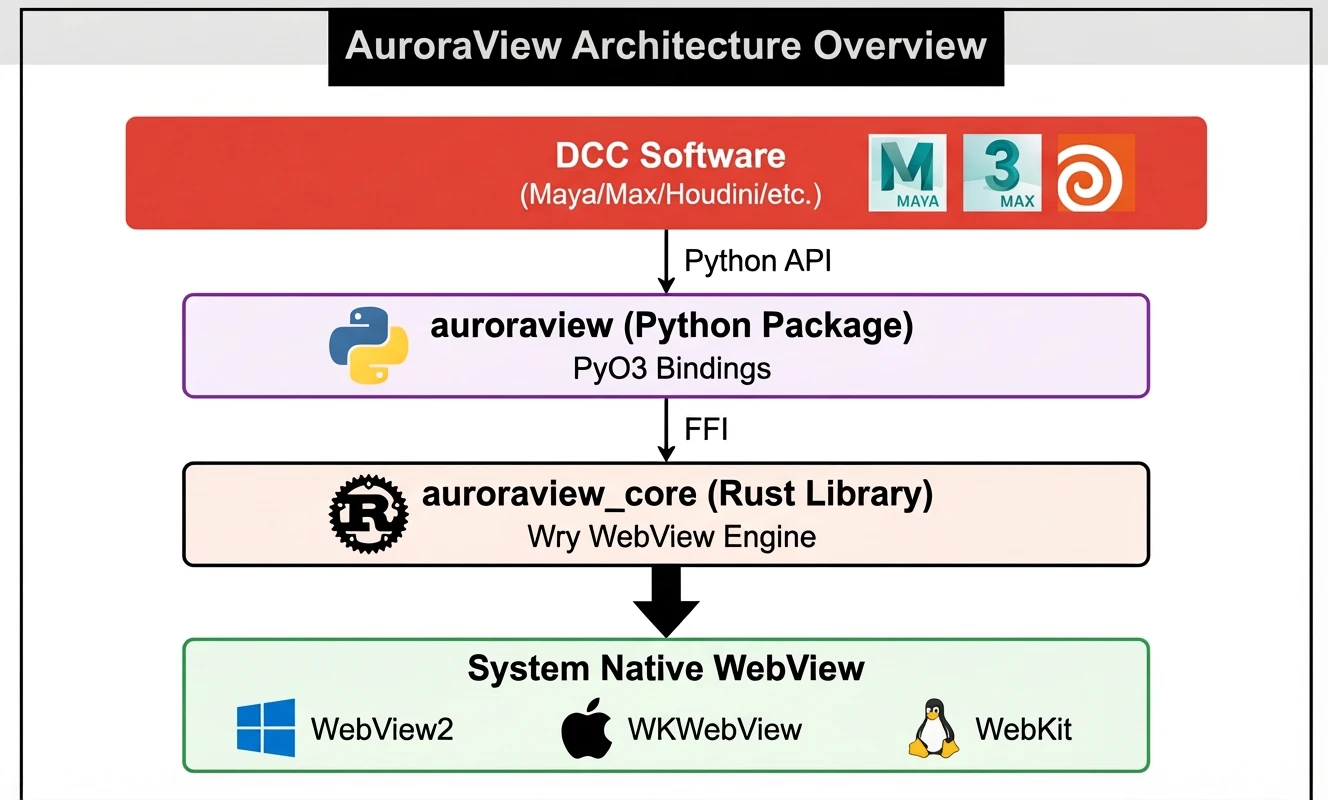
A page is the interface. A declared API is the boundary. The host executes its scene operations and returns observable state. This page follows the main Python / Rust integration and the original AuroraView layer diagram. A separate native adapter may reuse the bridge contract with its own implementation; inspect its host record.
A click handler calls a declared method through the SDK. call() returns a Promise; on() subscribes to host events. The page controls presentation and feedback.
AuroraViewClient: call / on / emit ↗IPC carries the method, parameters, and request identity through the native bridge. Rust provides protocol and backend boundaries; PyO3 connects the Python-facing implementation.
Shared IPC builder and Python bindings ↗bind_call() or bind_api() exposes a callable. A configured set_call_dispatcher(), or the registered host dispatcher, schedules it on the permitted thread. The DCC-mode path rejects an unsafe fallback; a lock alone does not grant scene-thread access.
WebViewApiMixin: bind_call / bind_api / set_call_dispatcher ↗The host function performs the operation, then reads the state needed by the tool: selection, object identity, hierarchy, or another declared result. A scene readback is application logic supplied by the host integration.
Host adapters and end-to-end examples ↗The request result settles its Promise; host changes can also be emitted as events. Python emit() uses the native command target, and the SDK routes window.auroraview.trigger() events to subscribers.
WebViewEventsMixin and SDK events ↗Update the interface from returned data and subscribed events. Show structured errors and release subscriptions when the tool closes. A successful message send is separate from the scene result the tool reads back.
SDK event subscriptions and unsubscribe contract ↗Use a call when you need a result, and an event when you do not. The low-level window.auroraview bridge and the TypeScript SDK share this direction model.
| Direction | Page API | Python boundary |
|---|---|---|
| Page → host, request / response | call(method, params, options) → Promise | bind_call(method) / bind_api(...) |
| Page → host, fire and forget | send_event(event, detail); SDK client.emit(...) | @webview.on(event) |
| Host → page, notification | on(event, handler) → unsubscribe | webview.emit(event, payload) → trigger(...) |
trigger() delivers events inside JavaScript; calling it in a page does not send a message to Python. Call results use the internal __auroraview_call_result event with id, ok, and result or error. Save the function returned by on() and invoke it to unsubscribe.
The current call handler captures the request identity, schedules invocation, validates a JSON result, and reports structured errors. Pending-call generations prevent stale callbacks from completing after close. Event dispatch has its own owner queue and disconnect guards; synchronous closing veto callbacks need a separate lifecycle path.
Read the communication guide ↗Framework-agnostic calls, events, readiness, feature detection, and browser-oriented interfaces. Use React, Vue, or plain JavaScript around that public boundary.
TypeScript SDK exports ↗The Python package binds host operations and integrates with the host event loop. PyO3 exposes Rust functionality to Python. Qt integrations retain Qt’s event-loop ownership.
Python API / Rust bindings ↗Shared protocol and backend interfaces separate communication from native rendering. The current workspace uses Wry with the wry-builder feature; Windows DCC embedding also has a direct WebView2 path.
WebViewBackend trait ↗The system-engine model is WebView2 on Windows, WKWebView on macOS, and WebKitGTK on Linux. Actual engine availability and native docking depend on the chosen backend and host adapter. WebView2 objects stay on their owning STA thread.
Windows DCC WebView implementation ↗An Agent entry point declares discovery, parameters, results, errors, and host scope. The current AuroraViewAdapter exposes eval_js, screenshot, load_url, and load_html with panel/session context. Scene tools and scene semantics require explicit host or Skill registration; they do not appear automatically from a web page.
Current adapter declarations ↗A native panel owns its presentation, connections, subscriptions, and tasks. The proposed shared-runtime integration prefers attaching to an existing DCC-MCP service and execution bridge. Closing a panel must leave borrowed host services running; creators must close the resources they own. That integration remains planned and still needs compatibility and real-host acceptance.
Read the proposed shared-runtime model ↗Tabs, windows, storage, runtime messages, and feature detection are exposed through SDK surfaces. Check the backend and enabled feature rather than assuming a complete browser implementation.
SDK browser and feature APIs ↗Dedicated code handles manifests, extension lifecycle, messaging, and API compatibility. Compatibility is API-specific and needs validation for the extension you ship.
auroraview-extensions ↗Packing combines frontend assets, services, configuration, and native startup into a target artifact. It is a build-time concern; deployment still needs the target’s engine, installation, and lifecycle checks.
auroraview-pack ↗Start with a standalone frontend and run_desktop(). Bind one host operation, subscribe to one event, and read back a result. Then choose the native host adapter and use its installation and lifecycle requirements.